
Quick answer
To start making friends, use Phone → Ride or the Map to reach a shared venue, post a greeting in local chat, then open a Real player profile and choose Chat. Confirm that your message appears in the intended conversation. The supplied friends tutorial demonstrates a beach arrival, local Hello, and a private Hi marked Sent; it does not show the recipient replying.
On this page
Watch the relevant source segment
HowTo Edu · 0:30–0:57 on YouTube
The original video link remains available if the player cannot load.
Reach a venue before starting local chat
HowTo Edu's friends tutorial, 0:30–0:57 selects Elegushi Beach in Ride, chooses Keke, and travels until the venue name appears in the scene.
- Open Phone → Ride and choose a destination, or select it on the Map.
- Read the full place name and available transport.
- Select a permitted mode, check the Go cost and begin the trip.
- Wait for the scene to show the intended venue.
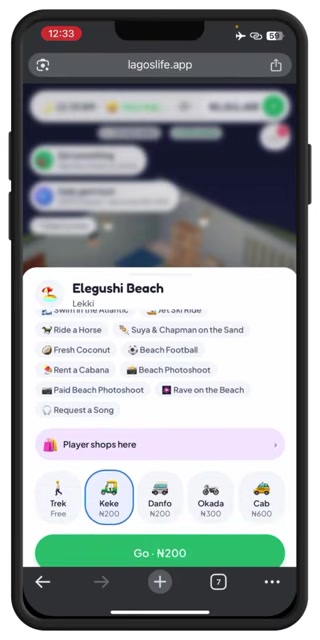
HowTo Edu, 0:35, uploaded 7 October 2026. Play the travel-and-arrival excerpt. The displayed ₦200 is this recorded journey's fare.
The video reaches the beach around 0:52–0:53. Its narration loosely describes the transport; the visible selection is Keke. Do not assume this venue is always busy or that its fare applies to every trip.
CcHub and Amala Shitta are other places shown in KKC Games' longer session, 3:34–5:35. Check who is present in your current session. Use map and locations for venue names and game hours.
Send a local greeting
Open the venue panel and use Say something to the players here…. Type a short introduction and send it. Look for the resulting message in that scene.
HowTo Edu, 1:00–1:07.5. Play or pause the MP4 or view the posted Hello as a still. The short clip shows the recorded example.
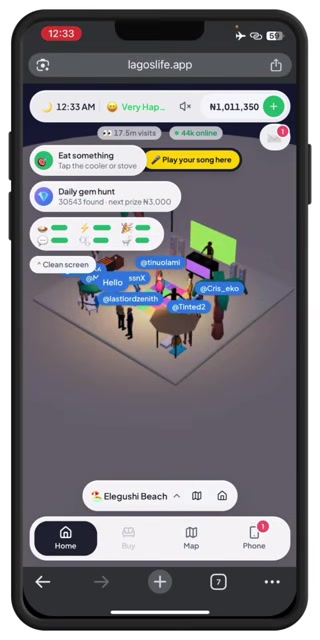
A typed “hello” is a chat message. The separate Say Hello and Gist action cards are game interactions with their own conditions and effects. Sending text does not provide a fixed relationship-point receipt.
Open the right player's private chat
- Select a character and check the profile's @username and Real player label.
- Choose Chat to open that player's private thread.
- Check the recipient in the header before writing.
- Send your message and inspect its status. Give the other person time to answer.
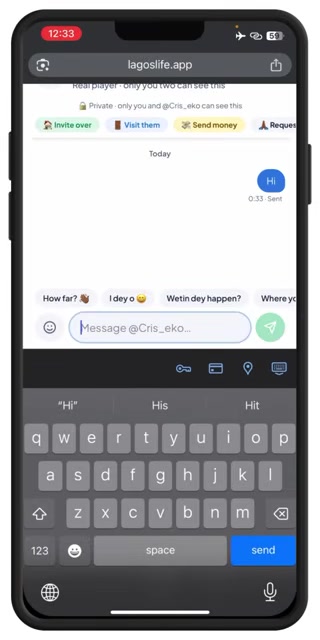
HowTo Edu, 1:13–1:23. Play or pause the MP4 or view the Hi and Sent status. No reply appears in this excerpt.
| Signal | What it establishes |
|---|---|
| Real player on the profile | You selected a player account |
| Correct @username in the thread | You opened the intended conversation |
| Your message appears with Sent | The sender's thread reports that message as sent |
| A reply appears | The other person has responded |
| Relationship or partnership changes | A separate game state changed; typed chat alone does not prove it |
Do not treat a sent greeting as mutual friendship or an accepted Bae request.
Find someone when you know their username
The full features guide shows Phone → Messages and Message someone: @username around 17:39.
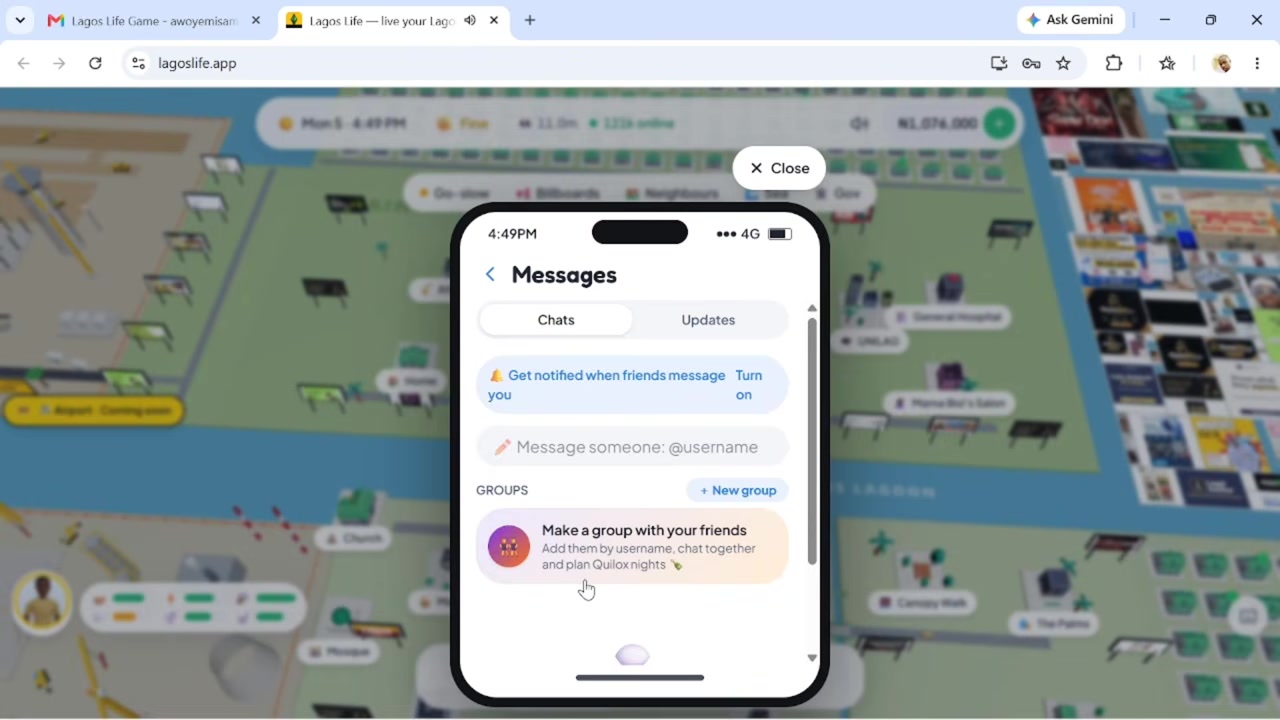
Samuel Awoyemi H-QTV, 17:39, uploaded 6 October 2026. The video shows the input without executing a username search.
Use that entry when you know the handle, then check the person shown by your current game. The clip does not verify search results, fuzzy matching or message delivery to an offline account.
Is there an Add Friend button?
The filmed profile offers Chat, Add as family, social actions and a Bae progress message. It does not demonstrate a general Add Friend operation. Start with conversation rather than interpreting Add as family as the same action.
A named NPC and a Real player use different relationship rules. If your goal is closeness or a Bae request, use the relationship reference and the current profile rather than applying NPC numbers to another player.
When you cannot find people or a message
Check that travel has finished and the venue name is correct. If you only find NPCs, inspect another character's profile or try another available venue; no supplied material establishes a guaranteed population or best real-world hour.
If your greeting is absent, check the input and send status before retrying. If the private header identifies someone else, stop and reopen the intended profile. Respect a declined invitation or an unanswered message.
This guide uses the actual travel and chat sequence plus the longer guide's username entry. It confirms the sender-side Hello and Hi examples, without claiming a new two-account conversation or an automatic friendship result.