
Quick answer
To sign up, open lagoslife.app, choose Sign up, complete Create account, and select Sign up · it's free. The form inspected on 11 October 2026 requires your name, username, an eight-character minimum password, date of birth and the 18+ agreement. Email is optional. After the form is accepted, follow the character setup offered by your game.
On this page
Watch the relevant source segment
MoneyPro-Tips · 1:34–1:45 on YouTube
The original video link remains available if the player cannot load.
Fill the current Create account form
| Field | Rule to follow |
|---|---|
| Your name | Enter the name requested by the form |
| Username | Use 3–20 letters, digits or underscores; availability is checked separately |
| Password | Use at least 8 characters |
| Email (optional) | Attach a valid email if desired; the hint says it can also identify your login |
| Date of birth | Complete Day, Month and Year |
| Agreement | Read the linked policies and confirm the 18+ declaration |
The username format comes from the official registration validation. The visible password hint, date fields and agreement are in the captured form.
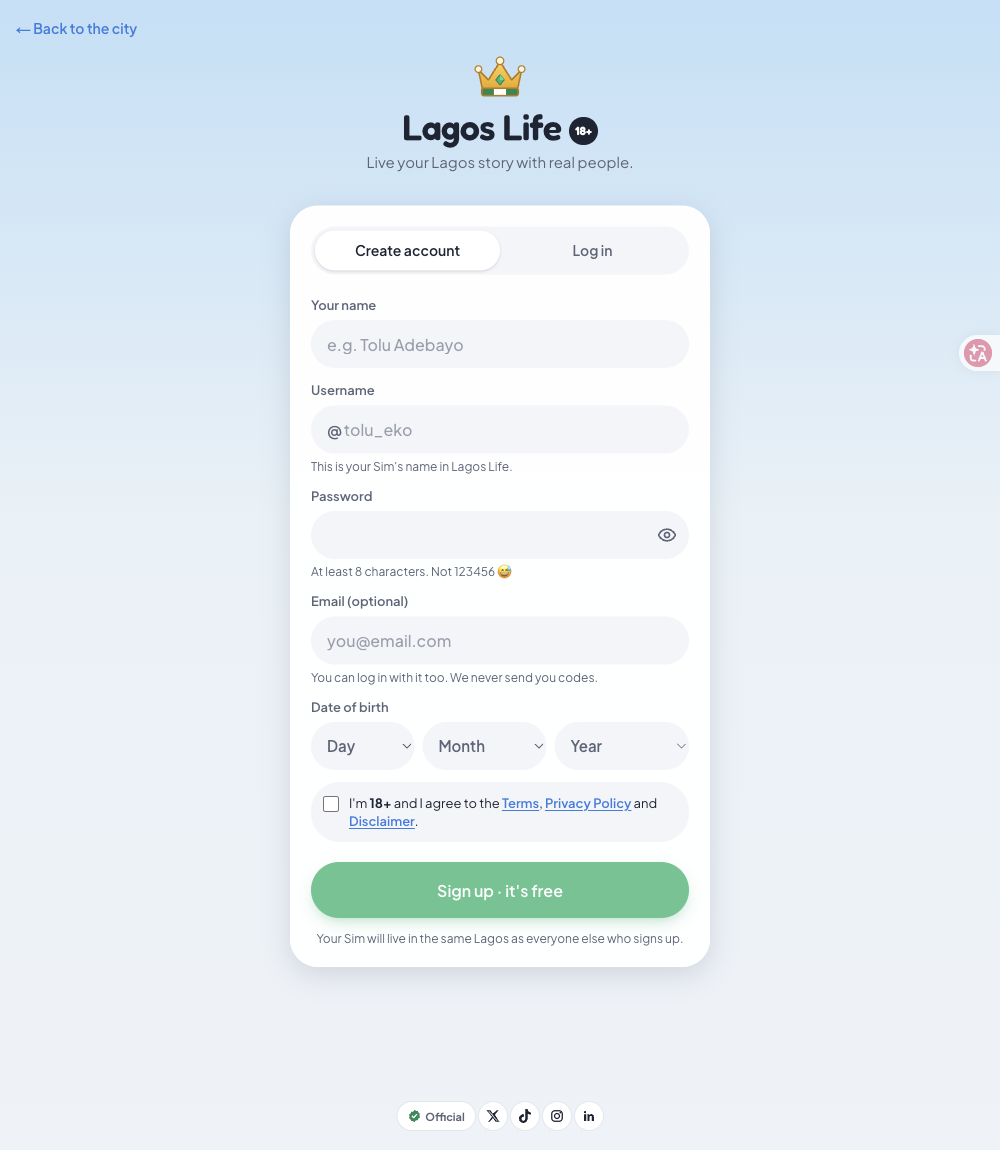
Official form captured on 11 October 2026. Its email hint says the game does not send codes.
- Select Sign up on the public city and check Create account is selected.
- Enter your name and choose a username. Spaces and punctuation other than underscores do not fit the inspected username rule.
- Set your password and complete your date of birth.
- Add a valid email or leave the optional field empty.
- Review the agreement and submit the form. The official Terms require players to be 18 or older.
- Read the result. Correct a reported field error before retrying; a loading indicator does not confirm registration.
If you already have an account, use Log in to return to it.
Recognise the first character setup
MoneyPro-Tips — How to Create an Account on Lagos Life Game moves from an edited registration section into Look, then shows traits, a lifetime dream, a birth lottery and a home choice. The useful appearance section starts around 1:32.
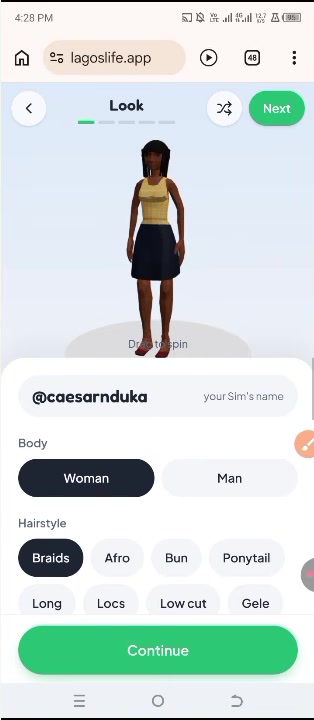
Video frame: MoneyPro-Tips, 1:35, uploaded 5 October 2026. Play the Look setup excerpt, 1:34–1:45.
The clip shows changing appearance choices, not the current account fields. Continue through the setup your game displays. The tutorial reaches the birth lottery around 3:45; use the Nepo Baby vs LAPO Baby guide for those outcomes rather than treating one player's roll as a probability.
Reaching character setup is a stronger registration signal than seeing the public map. Once your own character enters the game, use the beginner guide for needs, work and early spending.
Why the tutorial's form looks different
The 5 October video shows a six-character password hint and an older email-recovery explanation. The 11 October official form shows at least eight characters, date-of-birth selectors and the age agreement. Use the newer visible form for account requirements; use the tutorial for recognising setup.
An older statement that accounts without email cannot recover access should not override the current Forgot password? and Can't get in? controls. The login recovery section explains those paths.
Fix a rejected or unfinished registration
| What happens | What to check |
|---|---|
| Username rejected | Check format and length; choose another handle if unavailable |
| Password rejected | Meet the current eight-character minimum |
| Optional email rejected | Correct its format or leave the field empty |
| Date or agreement incomplete | Complete all date selectors and review the age declaration |
| Account already exists | Use Log in or recovery for that account |
| Submission remains loading | Wait for the actual response before treating the account as created |
This walkthrough combines the dated registration video with the official form inspected on 11 October 2026. The video edits between registration and setup; it is not an uninterrupted recording of current form submission, and no new account was created for this revision.